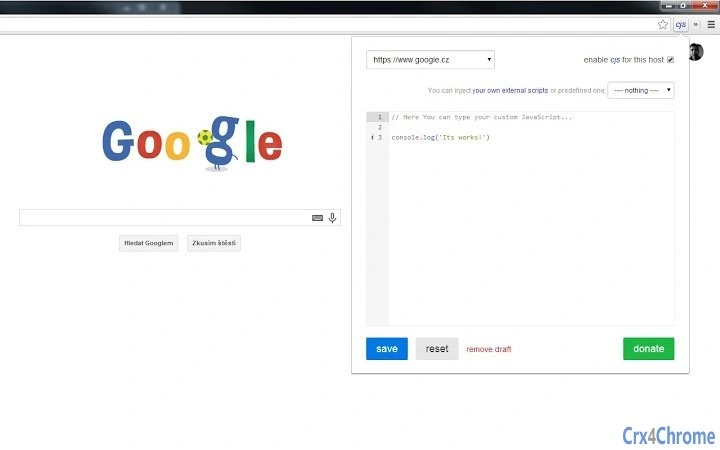

Inject Custom JavaScript Across Websites
Overview
The software enables users to inject custom JavaScript code into any website they visit, offering a powerful way to modify or debug web content on the fly. Designed for developers, testers, and advanced users, it allows real-time execution of scripts across multiple domains without requiring changes to the website’s source code. The tool is particularly useful for troubleshooting issues such as incorrect list sorting, debugging dynamic content, or blocking intrusive popups and advertisements.
Scripts are stored locally, ensuring privacy and persistence across browsing sessions. Users can leverage preloaded libraries like jQuery 1.11.0 or 2.1.0, or include external scripts such as Underscore.js for enhanced functionality. The tool supports execution within embedded iframes, expanding its utility in complex web environments. It is built for users who need fine-grained control over web page behavior without relying on browser extensions or third-party tools.
Although the developer name is not provided, the software integrates well-known open-source components such as Ace Editor and Pure CSS, suggesting a focus on reliability and modern development practices. The tool is suitable for both professional debugging workflows and personal customization of web experiences.
Key Features & Capabilities
- Custom JavaScript Injection – Run user-defined scripts on any website, enabling real-time modifications to page behavior or content.
- Local Script Storage – Scripts are saved in local storage, allowing persistent access across different domains and sessions.
- jQuery Library Support – Built-in compatibility with jQuery 1.11.0 and 2.1.0 for quick DOM manipulation and debugging.
- External Script Inclusion – Load external libraries like Underscore.js directly from CDN or local sources.
- Ace Editor Integration – Advanced code editor with syntax highlighting, undo/redo via hotkeys, and formatting support.
- Draft Auto-Save – Automatically saves unsaved script drafts, preventing loss when closing the application.
- Hosts Switching – Easily switch between different websites’ script configurations for efficient workflow management.
- iframe Script Execution – Execute scripts within embedded iframes, useful for debugging complex web applications.
These features empower users to streamline repetitive debugging tasks, customize web experiences, and test changes without altering original code. For example, a developer can quickly test a fix for a misbehaving form element or hide unwanted elements on a site using a simple script. The tool’s flexibility makes it ideal for both one-off fixes and long-term development workflows.
User Interface, Workflow & Performance
The user interface is designed with usability in mind, featuring a clean layout centered around a code editor and script management panel. Navigation is straightforward, allowing users to select target websites, load saved scripts, and initiate execution with minimal steps. The integration of the Ace Editor enhances the coding experience with real-time syntax highlighting and keyboard shortcuts for undo and redo.
Workflow efficiency is improved by features such as auto-save and host switching, which reduce context switching and minimize the risk of losing work. The application runs as a desktop tool, operating independently of the browser, which ensures consistent behavior across different browsing environments.
Performance observations are based on general software behavior patterns. The developer did not specify resource usage details. However, given the application’s lightweight nature and the absence of real-time monitoring or background processes, it is expected to have minimal impact on system performance. Stability is assumed to be consistent, especially since the tool does not rely on external services for core functionality.
Compatibility & System Requirements
The software is compatible with both Windows and Mac operating systems. It supports the latest versions of these platforms, as indicated by the provided information. The installation size is 10.2 MB, which suggests a lightweight footprint suitable for most modern desktop environments.
Exact system requirements were not listed. The developer did not provide additional system requirements. Hardware specifications such as CPU, RAM, or GPU usage were not specified. Users are advised to ensure their system meets standard desktop application requirements for smooth operation. The tool does not require administrator privileges for installation or execution.
Pros and Cons
Pros
- Allows injection of custom JavaScript across any website without browser extensions
- Scripts are stored locally, ensuring privacy and persistence
- Supports popular libraries like jQuery and external scripts via CDN
- Advanced Ace Editor with formatting, syntax highlighting, and undo/redo
- Auto-save feature prevents loss of unsaved work
- Host switching enables quick access to different site configurations
- Free to use with no licensing restrictions
Cons
- Developer name not publicly available
- No official documentation or user guide provided
- Exact system requirements not specified
- Performance impact on system resources not disclosed
- Only supports Windows and Mac platforms
FAQ Section
Is this software compatible with Windows and Mac?
Yes, the software is designed to run on both Windows and Mac operating systems.
Can I use external JavaScript libraries like jQuery or Underscore.js?
Yes, the tool supports the use of jQuery 1.11.0 or 2.1.0, as well as external scripts such as Underscore.js.
Are my scripts stored securely?
Scripts are stored in local storage on your device, ensuring they are not shared or transmitted to external servers.
Does the software require an internet connection?
While the tool operates offline, some external scripts may require an internet connection to load from a CDN.
Is the software free to use?
Yes, the software is available at no cost and does not require a license key or subscription.
Final Thoughts + CTA
This desktop utility stands out as a practical and efficient solution for developers and advanced users seeking to inject custom JavaScript across websites. Its ability to store scripts locally, support external libraries, and execute code within iframes makes it a versatile tool for debugging, content customization, and workflow optimization. The inclusion of an advanced code editor and auto-save functionality enhances usability, while the free pricing model increases accessibility.
Although the developer identity remains undisclosed and detailed system requirements are not provided, the tool’s functionality and stability appear reliable based on its feature set and integration with trusted open-source components. It is best suited for professionals and power users who need precise control over web content without relying on browser extensions.
Download Inject Custom JavaScript Tool now







